

Logo
  • PHP
    • HipHop / HHVM
    • Modern PHP
    • PHPStorm
    • LAMP
    • Laravel
    • Composer
    • PDO
  • JavaScript
    • node.js
    • AngularJS
  • CSS
    • SASS
    • “CSS4” (CSS level 4)
  • HTML
  • Git
  • LAMP
  • Vagrant
  • UI / UX
  • Architecture of …
  • Off-Topic
With ♥ from Berlin
How to install/setup a basic LAMP stack (Linux, Apache, MySQL, PHP) on Ubuntu 12.04 or Debian 7.0/7.1

How to install/setup a basic LAMP stack (Linux, Apache, MySQL, PHP) on Ubuntu 12.04 or Debian 7.0/7.1

This little tutorial shows how to setup Apache, MySQL and PHP on a Linux server, in this case Ubuntu 12.04

September 1, 2013
Chris
Debian, LAMP, Linux, PHP, Ubuntu
Comments Off on How to install/setup a basic LAMP stack (Linux, Apache, MySQL, PHP) on Ubuntu 12.04 or Debian 7.0/7.1
PreviousNext

This little tutorial shows how to setup Apache, MySQL and PHP on a Linux server, in this case Ubuntu 12.04 LTS (by the way, if you want to know what LTS means, have a look into the wikipedia article) or Debian 7.0/7.1.

Most tutorials are making it overcomplicated, and beside that most commands (like apache restarting etc.) are not necessary anymore today. Log into your server…

1. Do an update and an upgrade to keep everything up-to-date:

sudo apt-get update
sudo apt-get upgrade

2. Install Apache:

sudo apt-get install apache2

3. Install PHP:

sudo apt-get install php5

4. Install MySQL, mysql module for PHP and PDO stuff:

sudo apt-get install mysql-server
sudo apt-get install php5-mysql

Provide a new mysql root password when asked. Then restart the server:

sudo service apache2 restart

By the way, then you think you messed something up while installing a package then you can remove the package and its config files via

sudo apt-get autoremove phpmyadmin


Have a look on your server to make sure Apache runs:
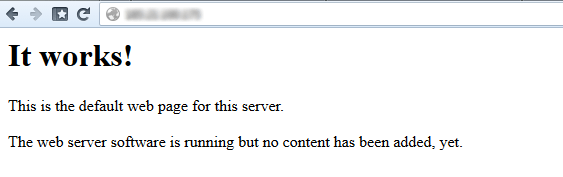
lamp apache mysql php on ubuntu 12.04

Cool ! Now let’s install PHPMyAdmin to make sure PHP and the MySQL server run and work together:

sudo apt-get install phpmyadmin

Select “apache2” when asked, select with SPACE and confirm with ENTER. Press ENTER when asked for auto-configuration and provide a new password for the phpmyadmin root user and mysql root passwords when asked for password (I use the same for this, to keep things simple). You don’t need to restart anything and there’s no need to config anything right now.

Have a look on PHPMyAdmin via

http://YOUR_IP/phpmyadmin/

and you’ll see the phpmyadmin login screen. Log in to prove that everything runs fine.

Done!

NOTE: in a real live application you should not log into the server as the root user, not provide the root password to phpmyadmin and in general not have phpmyadmin available on the live server, but for a development server that’s totally okay.


apachedebianLAMPMySQLPHPphpmyadminUbuntu
Share this

Install MINI in 30 seconds inside Ubuntu 14.04 LTS

This is a guideline on how to install MINI – an extremely simple naked PHP application – more or less

What’s new in PHPStorm 9

PHPStorm 9 has just been released a few days ago, and as a PHP developer you should definitly give it

composer

The difference between “composer install” and “composer update” – nailed on the head

What a beautiful, direct and clean explaination of the often-confusing difference between composer install and composer update: Beau Simensen (Twitter,

JavaScript ECMAScript6 – A short video introduction (5min)

Excellent introduction into the new ECMAScript6, the spec behind JavaScript.

logo-internet-explorer

How to professionally test on old Internet Explorer versions

If you have (or want) to test your websites and applications on older versions of Internet Explorer, then there’s a

ilovepreloaders – A tumblr collection of preloader animations

An excellent collection of preloaders (GIFs, Movies and real ready-to-copy&paste code) here in this wonderful blog: http://ilovepreloaders.tumblr.com/ This thing just

Migrating Wikipedia to HHVM (@Scale Conference 2014)

Awesome topic, superfresh, directly from Scale Conference 2014. The title says everthing. Full quote from video’s description: As a top

Awesome next-gen PS4 graphics in “The Order: 1886”

We are entering a very interesting time: The differences between cinematic movies and video games are getting lesser and lesser.

hiphop php

Vote for “Hack” for HipHop/HHMV support (future style PHP) in PHPStorm 8

“Hack” will come. And “Hack” will change PHP, definitly. In case you never heard of it, have a look into

phpstorm-8

A PHPStorm shortcuts cheat sheet (for Windows, Mac OS and Linux)

Shortcuts that will make you life so much easier! Please note: Frontend Devs might be irritated by the weird CTRL-Y-shortcut,

1/4

Categories

Search

[Link] Redesigning SoundCloud by Evan Simoni
Useful basic linux stuff: Show kernel version, distribution name and distribution version on Ubuntu systems
[Link] Making a website vertically responsive
harper reed about big data
Harper Reed – The magic and mystery of Big Data (30min video from Webstock’15)
zend framework 3
First view on Zend Framework 3 by Matthew O’Phinney
hearthbleed-ssl-bug
A quick guideline on how to fix the Hearthbleed bug (and update OpenSSL) on Ubuntu
sass laravel
SASSmeister is a real-time JSfiddle for SASS / CSS. Awesome!
php
PHP.net hacked, but most things are fine again
phpstorm 7.0 php
PHPStorm 7 has been released!
php uk conference
Slides & talks from PHP UK Conference 2014
css
How to center a div vertically and horizontally (modern methods, without fixed size!)
bitdeli git github stats
Get visitor stats for your GitHub repo with BitDeli
redaktionelle-hochlastseiten
Hochlastseiten mit PHP, MySQL und Apache am Beispiel stern.de (deutscher Artikel)
github-logo-octocat
GitHub rolls out .PSD diff and viewing
phpstorm 7.0 php
How to install GitHub’s, NetBeans’s and Sublime2’s syntax highlighting code colours theme in PHPStorm 6/7

Tags

apache bash centos composer conference coupon CSS debian fonts framework git GitHub hack HHVM HipHop HTML HTML5 IDE JavaScript JS LAMP laravel linux mod_rewrite MVC MySQL Nginx optimization PHP PHP 5.5 PHP 5.6 phpmyadmin PHPStorm security server SSD Ubuntu UI UX vagrant video virtual machine voucher VPS wordpress
Side-Project: Wordle-Solver:
www.wordle-helper.info

Pages

  • Privacy Policy