
Logo
  • PHP
    • HipHop / HHVM
    • Modern PHP
    • PHPStorm
    • LAMP
    • Laravel
    • Composer
    • PDO
  • JavaScript
    • node.js
    • AngularJS
  • CSS
    • SASS
    • “CSS4” (CSS level 4)
  • HTML
  • Git
  • LAMP
  • Vagrant
  • UI / UX
  • Architecture of …
  • Off-Topic
With ♥ from Berlin
December 23, 2014
Chris
Bootstrap, LAMP, Local Development, mini, PHP
Comments Off on Install MINI in 30 seconds inside Ubuntu 14.04 LTS

Install MINI in 30 seconds inside Ubuntu 14.04 LTS

PreviousNext

This is a guideline on how to install MINI – an extremely simple naked PHP application – more or less automatically inside Ubuntu 14.04 LTS with just some very simple copy&paste-commands on the command line. The best thing: This will also automatically install Apache, PHP, MySQL, PHPMyAdmin, git and Composer, set a password in MySQL and PHPMyadmin and even inside the application code, download the Composer-dependencies, activate mod_rewrite and edit the Apache settings, download the script itself from GitHub and run the demo SQL statements (for demo data). This is 100% automatic (needs 30 seconds of work and +/- 5 minutes of automaticly running tasks), you’ll end up with a fully running installation of MINI. You can thank me later :)

Ah, and disclaimer: This is just the most simple possible setup, made for a quick preview and easy-to-start-with development. Here we use weak passwords, root access etc., so keep that in mind.

1. Log into your server. This script is made for a real, fresh and naked server running Ubuntu 14.04 LTS, not for 12.04, not for CentOS, not for shared hosting. Please don’t write comments and support requests saying “this does not work on my Godaddy hosting”. A developer dies every time somebody uses shared hosting or outdated linux versions.

2. Download the installer script:

wget https://raw.githubusercontent.com/panique/mini/master/_vagrant/bootstrap.sh

3. Make the script executeable:

chmod +x bootstrap.sh

4. Run the script, make sure you’re running it as sudo (otherwise you’ll have a broken installation):

sudo ./bootstrap.sh

Then the installer will run for some minutes, downloading and installing all the stuff, setting the passwords etc. When the script has finally stopped you’ll see “Voila!” on your shell.

The password for the MySQL root user and PHPMyAdmin is “12345678”.

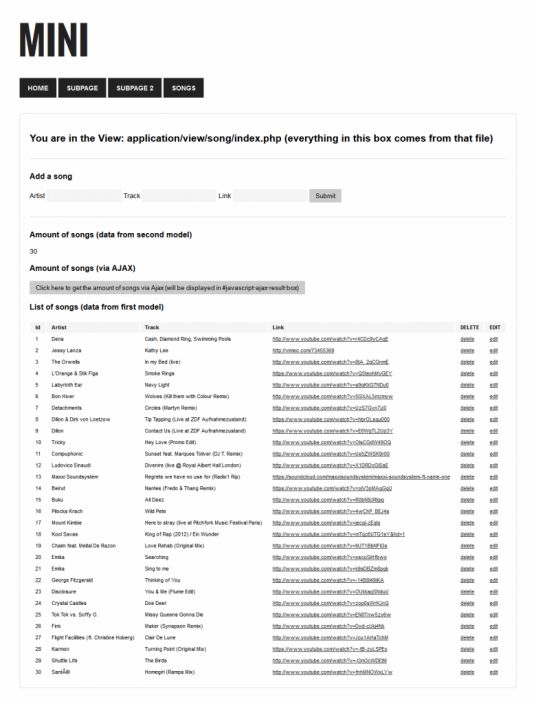
Check your IP in the browser and you’ll (hopefully) see a running installation of MINI:
MINI

frameworkMVCPHP
Share this

Increase your HTML / CSS coding speed with EMMET

Codeninja.com just published a very interesting article about the excellent free code-completion/code-generation tool EMMET, which allows you to create huge

[Link] Improving Smashing Magazine’s Performance: A Case Study

The title says it all: A very interesting guide through the optimization process on one of the largest blogs in

php uk conference

PHP Opcache Explained by Julien Pauli (video from PHP UK Conference 2014)

The title says it all. A VERY deep explanation on how OpCache works. If you never heard of this excellent

MINI, an extremely simple barebone PHP application

For my daily work I often needed to setup super-simple PHP applications, just some more or less static pages plus

sass laravel

SASSmeister is a real-time JSfiddle for SASS / CSS. Awesome!

Excellent tool for testing out SASS in real-time! SASSmeister.com offers a responsive (!) interface for quick SASS-to-CSS development with some

phpstorm-8

Ignore .idea folder from git in PHPStorm

By default (?) PHPStorm will create a hidden folder named .idea directly within your project, containing user-specific stuff like chosen

symfony-framework-logo

SensioLabs, creator of Symfony and Silex PHP frameworks, gets $7 million capital

The company behind the two popular PHP frameworks Symfony and Silex just raised 7 million dollars to “expand their open-source

cheap cloud server php

DigitalOcean rolls out interesting feature: Transfering server snapshots directly to the client’s account

Today DigitalOcean has rolled out a quite interesting new feature: You are now able to transfer a server snapshot (which

phpstorm 7.0 php

A perfect video tutorial to get started with xdebug in PHPStorm

Laracast just published an excellent short tutorial on how to get install xdebug in a local environment and how to

How to show the available version of a package (before doing apt-get install)

To show the version of the package that will be installed with apt-get install, do apt-cache policy packagename. To show

1/4

Categories

Search

Meet the developers behind Ableton (14min video)
php-7
PHP 6.0 will be PHP 7
php
PHP.net hacked, but most things are fine again
Ghost
[FREE SERVER PROMO] Install GHOST for free on a free SSD server with this coupon
frontend-workflow
[german] Modernes Frontend-Development mit Bower, Grunt, Yeoman (45min Video, Thorsten Rinne auf der IPC2013)
php
How the PHP session garbage collector really works
phpstorm-github-code-color-syntax-theme
Get Github’s code colors in PHPStorm (2014 style)
compress-png
Compress png, jpeg, gif and svg up to 90% with Compressor.io
phpstorm-8
A PHPStorm shortcuts cheat sheet (for Windows, Mac OS and Linux)
How to setup a config-free WordPress, PHP and MySQL (for local development) in Windows 7 / 8 in under 3 minutes
Microsoft enters post-password era with Hello (promo video)
Frontend Ops Conf 2014 – Rebooting Flickr On A Node.js Stack, One Page At A Time (from PHP) by Bertrand Fan
How to fix the ugly font rendering in Google Chrome
Test GZIP compression of your server easily
The New Era of JavaScript (28min conference talk, Jack Franklin, 2013)

Tags

apache bash centos composer conference coupon CSS debian fonts framework git GitHub hack HHVM HipHop HTML HTML5 IDE JavaScript JS LAMP laravel linux mod_rewrite MVC MySQL Nginx optimization PHP PHP 5.5 PHP 5.6 phpmyadmin PHPStorm security server SSD Ubuntu UI UX vagrant video virtual machine voucher VPS wordpress
Side-Project: Wordle-Solver:
www.wordle-helper.info

Pages

  • Privacy Policy