
Logo
  • PHP
    • HipHop / HHVM
    • Modern PHP
    • PHPStorm
    • LAMP
    • Laravel
    • Composer
    • PDO
  • JavaScript
    • node.js
    • AngularJS
  • CSS
    • SASS
    • “CSS4” (CSS level 4)
  • HTML
  • Git
  • LAMP
  • Vagrant
  • UI / UX
  • Architecture of …
  • Off-Topic
With ♥ from Berlin
April 21, 2014
Chris
LAMP, Linux, Local Development, PHP, Server, Ubuntu
Comments Off on How to enable mod_rewrite in Ubuntu 14.04 LTS

How to enable mod_rewrite in Ubuntu 14.04 LTS

PreviousNext

A little note first: This is the most basic way to enable mod_rewrite. However, it’s not the best way. The more correct way would be to setup a vhost and change its config, but unless you are a professional and know exactly what you do this thing will do the job perfectly.

Please note that Ubuntu 14.04 LTS comes with Apache 2.4, while Ubuntu 12.04 LTS came with Apache 2.2. This new version introduced different default config filenames and in general some differences.


Activate the mod_rewrite module with

sudo a2enmod rewrite

and restart the apache

sudo service apache2 restart

To use mod_rewrite from within .htaccess files (which is a very common use case), edit the default VirtualHost with

sudo nano /etc/apache2/sites-available/000-default.conf

Search for “DocumentRoot /var/www/html” and add the following lines directly below:

<Directory "/var/www/html">
    AllowOverride All
</Directory>

Save and exit the nano editor via CTRL-X, “y” and ENTER.

Restart the server again:

sudo service apache2 restart

Voila! To check if mod_rewrite is installed correctly, check your phpinfo() output. It should have this in it:
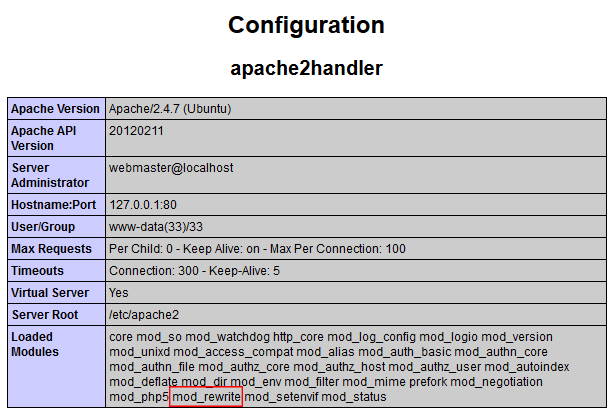
mod-rewrite-apache-2-4

apachemodmod_rewriterewrite
Share this

Frontend Ops Conf 2014 – Keynote by Alex Sexton: “Front End Operations”

https://www.youtube.com/watch?v=7HGe8zZ1G6k

php

How to install latest PHP 5.4.x on Ubuntu 12.04 LTS (Precise Pangolin)

Disclaimer: Currently 5.5 is the very latest version of PHP, but the common way to install PHP 5.5 has a

bash-command-line-tutorial

Best introduction to unix command line / bash ever (by André Augusto Costa Santos)

php

Somebody is writing a compiler for PHP, compiles down to machine code, outperforms HHVM

Yes, that’s right. Recki-CT compiles PHP down to machine code. It’s unbelievable what’s going on in the PHP world in

phpstorm-8

A PHPStorm shortcuts cheat sheet (for Windows, Mac OS and Linux)

Shortcuts that will make you life so much easier! Please note: Frontend Devs might be irritated by the weird CTRL-Y-shortcut,

Dangerous Performance Myths in the Web (video talk by Thomas Lohner, PHPUG Latvia)

A very interesting talk from Latvia’s (not 100% sure) PHP usergroup meeting: Thomas Lohner (of SysEleven) explains why some of

sass

[german video] Modernizing and minimalizing frontend markup code at AutoScout24

As this blog has a lot of german speaking readers I’ll post german stuff from time to time. Sorry for

ubuntu-14.04-lts

First view: Ubuntu 14.04 LTS brings PHP 5.5 and Apache 2.4

Short first view on Ubuntu 14.04 LTS (= long term service): I just tried out the alpha1 version of the

modern-php

Creator of Slim framework and “PHP – The right way” writes book: “Modern PHP”, available 2015

Definitly something every non-superexpert-PHP-developer should have on its books-to-buy-in-2015-list: Josh Lockhart, creator of the legendaray Slim framework and the famous

JavaScript ECMAScript6 – A short video introduction (5min)

Excellent introduction into the new ECMAScript6, the spec behind JavaScript.

1/4

Categories

Search

Install MINI in 30 seconds inside Ubuntu 14.04 LTS
php-legacy-code
Interesting talk on modernizing a legacy PHP codebase
css3-chrome-font
Google rolls out Chrome 37, finally fixes horrible font-rendering
php
12 tools for better PHP quality
How to install/setup latest version of PHPMyAdmin on Ubuntu 12.04 LTS (Precise Pangolin)
phpstorm-8
PHPStorm 8 has just been released
Quick fix for 404 error in WordPress category / tag page
set up a local virtual machine for development with vagrant and puphpet / puppet (and ubuntu, linux, php, apache, mysql)
A list of downloadable Vagrant boxes (CentOS 5.9 / 6.4, Ubuntu 12 / 13, Debian 6 / 7 / 7.1 / 7.2)
vagrant
How to setup a (or multiple) server/LAMP-stack inside a virtual machine for local development with Vagrant and PuPHPet
the-php-login-project
How to install php-login-minimal on Ubuntu 12.04 LTS
Migrating Wikipedia to HHVM (@Scale Conference 2014)
How to get a single table out of a massive MySQL .sql database backup file (mysql dump splitter)
-45% (or even 50%) off on DesignWall today
composer
The difference between “composer install” and “composer update” – nailed on the head
Disappointed by Watch Dogs’s graphics ? See how it looks with unlocked, hidden settings. Awesome!

Tags

apache bash centos composer conference coupon CSS debian fonts framework git GitHub hack HHVM HipHop HTML HTML5 IDE JavaScript JS LAMP laravel linux mod_rewrite MVC MySQL Nginx optimization PHP PHP 5.5 PHP 5.6 phpmyadmin PHPStorm security server SSD Ubuntu UI UX vagrant video virtual machine voucher VPS wordpress
Side-Project: Wordle-Solver:
www.wordle-helper.info

Pages

  • Privacy Policy