
Logo
  • PHP
    • HipHop / HHVM
    • Modern PHP
    • PHPStorm
    • LAMP
    • Laravel
    • Composer
    • PDO
  • JavaScript
    • node.js
    • AngularJS
  • CSS
    • SASS
    • “CSS4” (CSS level 4)
  • HTML
  • Git
  • LAMP
  • Vagrant
  • UI / UX
  • Architecture of …
  • Off-Topic
With ♥ from Berlin
December 15, 2013
Chris
Composer, PHP
Comments Off on How to install Composer on Windows 7 / 8 or Ubuntu

How to install Composer on Windows 7 / 8 or Ubuntu

PreviousNext
composer

Installation on Windows 7 / 8

Installing Composer on Windows 7 or 8 is extremely easy: Get the latest version of Composer from getcomposer.org (direct link to .exe here) and install it. You can now use Composer from everywhere on your system (via cmd.exe, PHPStorm or any other tool).


Installation on Unixes (Ubuntu, Debian, CentOS, …)

Most tutorials say that you should download the composer.phar file into your project, you’ve probably seen this before. But, this is outdated and not recommend! The better way to go is to “install” Composer. It’s also not possible to use Composer out-of-the-box, as this tool uses some things that need to be installed first: Composer is basically a PHP tool (which runs PHP on a webserver) that fetches remote files via git and curl over https (=openssl!). All tutorials I’ve ever seen totally miss these points. Installing Composer on linux needs a little bit of work first:

Do an update:

sudo apt-get update

First, make sure you have curl installed, so simply try to install it (if already installed, nothing will happen). Curl is a basic unix tool for file transfering (wikipedia). Install curl and the php5-curl extension:

sudo apt-get install curl
sudo apt-get install php5-curl

Then, make sure you have OpenSSL installed, a library that allows unix to handle HTTPS. A little notice on the Hearthbleed Bug that affected OpenSSL: Afaik this installs fixed/patched versions of OpenSSL, but I’m not 100% sure. Same procedure as with curl:

sudo apt-get install openssl

As Composer uses git, we also need to have git on the system:

sudo apt-get install git

Restart your server (will work without, but it’s always better to restart the Apache, otherwise PHP will say curl is not installed):

sudo service apache2 restart

Okay, now let’s install Composer:

curl -sS https://getcomposer.org/installer | php
sudo mv composer.phar /usr/local/bin/composer

This downloads composer.phar (which is a packed php archive by the way, see http://php.net/phar for more info) moved the file to a special folder, making it available systemwide.

Now you can use composer everywhere on your server on the command line via

composer

Type the above comamnd to make sure Composer is installed correctly. You’ll see something like this:
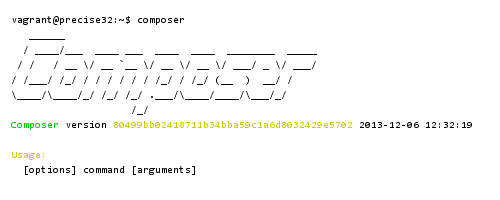
composer-install

Please note: A lot of tutorials show composer commands like that:

php composer.phar

That’s not necessary anymore as we have “installed” Composer. A single composer command followed by the arguments is all you need.

[wp_ad_camp_2]

Update Composer (on Windows 7/8 or Unixes)

Updating Composer itself is a one-line command, you can do this from anywhere in the system:

composer self-update


Have fun with Composer! It will change the way you work with PHP forever! To get into the basics of this tool, have a look into this article: Getting started with Composer.

composerPHP
Share this
php

Is there a JSFiddle for PHP ? Yes !

It’s awesome how UNknown these little and extremely powerful tools are: There are some online tools that let you paste

Frontend Ops Conf 2014 – Sarah Goff-Dupont: Git, Continuous Integration and Making It Pretty (31min video)

New project: Building a naked PHP skeleton / boilerplate application from scratch

[This post is from November 2013. In the meantime (I’m writing this in November 2014) the project has changed its

How to hack time (KUNG FURY promo campaign)

:) Finally, KUNG FURY is out! No need for further words, unless you lived in a cave for the last

photoshop-cc-deal

Adobe offers Photoshop for $9.99 per month (limited deal)

Currently Adobe offers the very latest version of Photoshop (which is Photoshop CC) for just $9.99 or 12,99€ (EU zone:

vagrant

A preinstalled Vagrant box with PHP HipHop / HHVM and Ubuntu 12.04 (Precise Pangolin)

This is the same post like this one, but this time with Ubuntu 12.04 Precise Pangolin. If you need to

Going node.js at Netflix (Slides by Micah R of Netflix)

It’s awesome how node.js takes over the absolute AAA-level corporate world. Note that node.js is still an early alpha product

A quick history of Comic Sans, the most wrongly used font ever

Excellent 10min presentation every frontend developer should see. Yes, even if you never touched Photoshop and never chose a font,

Ghost

[FREE SERVER PROMO] Install GHOST for free on a free SSD server with this coupon

A little off-topic, but highly interesting: In April 2013 the former User Interface Head of WordPress (and WordPress expert) John

phpstorm 7.0 php

PHPStorm 7 has been released!

DEV METAL does not get any money for saying this and there is no affiliate link or similar. This post

1/4

Categories

Search

php
“Belt” adds very clever everyday functions to PHP, comes with JavaScript naming styles and eventually solves the needle/haystack problem
css
How to center a div vertically and horizontally (modern methods, without fixed size!)
Create a fast, perfect and bootable 1:1 Windows backup (full clone of HDD) for SSD migration
[Link] Improving Smashing Magazine’s Performance: A Case Study
hack-php
Facebook releases HipHop (HHVM) 3.0, adds mysqli and support for Hack language
MINI2, an extremely simple barebone PHP application on top of Slim
goodbye-lamp-going-hhvm-nosql-nginx-php
[RePost] Goodbye LAMP: Going Nginx, NoSQL, HHVM (41min conference talk with Arne Blankerts)
php
[Link] Excellent PHP best practices, 2014 style
DEF CON 18 – When your computer got stolen and you can still SSH into it: “Pwned by the 0wner” (22min conference talk)
vagrant
A preinstalled Vagrant box with PHP HipHop / HHVM and Ubuntu 12.04 (Precise Pangolin)
New project: Building a naked PHP skeleton / boilerplate application from scratch
shadow dom
Crossbrowser-safe HTML5 video (IE6+) with a few lines of code and just one .mp4 video file
How to setup a config-free WordPress, PHP and MySQL (for local development) in Windows 7 / 8 in under 3 minutes
github-logo-octocat
GitHub rolls out .PSD diff and viewing
Frontend Ops Conf 2014 – Rebooting Flickr On A Node.js Stack, One Page At A Time (from PHP) by Bertrand Fan

Tags

apache bash centos composer conference coupon CSS debian fonts framework git GitHub hack HHVM HipHop HTML HTML5 IDE JavaScript JS LAMP laravel linux mod_rewrite MVC MySQL Nginx optimization PHP PHP 5.5 PHP 5.6 phpmyadmin PHPStorm security server SSD Ubuntu UI UX vagrant video virtual machine voucher VPS wordpress
Side-Project: Wordle-Solver:
www.wordle-helper.info

Pages

  • Privacy Policy